Functions | |
| ButtonCallbackRegister & | getButton0CallbackRegister () |
| get the button 0 callback register More... | |
| ButtonCallbackRegister & | getButton1CallbackRegister () |
| get the button 1 callback register More... | |
| ConnectionStateUI & | getConnectionStateUI () |
| get the connection state UI More... | |
| DeviceStateUI & | getDeviceStateUI () |
| get the device state UI More... | |
| HostHandshakeUI & | getHostHandshakeUI () |
| get the host handshake UI More... | |
| RemoteHandshakeUI & | getRemoteHandshakeUI () |
| get the remote handshake UI More... | |
| UserUI & | getUserUI () |
| get the UI available to the user More... | |
Function Documentation
◆ getButton0CallbackRegister()
| ButtonCallbackRegister & ApplicationInterfaceContainer::getButton0CallbackRegister | ( | ) |
get the button 0 callback register
Here is the call graph for this function:

◆ getButton1CallbackRegister()
| ButtonCallbackRegister & ApplicationInterfaceContainer::getButton1CallbackRegister | ( | ) |
get the button 1 callback register
Here is the call graph for this function:

Here is the caller graph for this function:

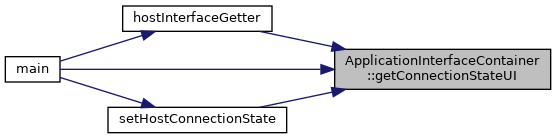
◆ getConnectionStateUI()
| ConnectionStateUI & ApplicationInterfaceContainer::getConnectionStateUI | ( | ) |
get the connection state UI
Here is the call graph for this function:

Here is the caller graph for this function:
◆ getDeviceStateUI()
| DeviceStateUI & ApplicationInterfaceContainer::getDeviceStateUI | ( | ) |
get the device state UI
Here is the call graph for this function:

Here is the caller graph for this function:

◆ getHostHandshakeUI()
| HostHandshakeUI & ApplicationInterfaceContainer::getHostHandshakeUI | ( | ) |
get the host handshake UI
Here is the call graph for this function:

Here is the caller graph for this function:

◆ getRemoteHandshakeUI()
| RemoteHandshakeUI & ApplicationInterfaceContainer::getRemoteHandshakeUI | ( | ) |
get the remote handshake UI
Here is the call graph for this function:

Here is the caller graph for this function:

◆ getUserUI()
| UserUI & ApplicationInterfaceContainer::getUserUI | ( | ) |
get the UI available to the user
Here is the call graph for this function: